Description
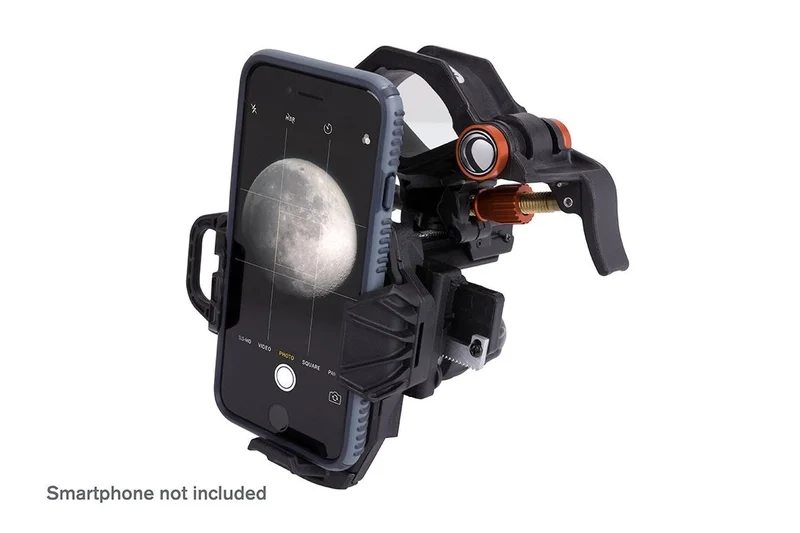
NexYZ connects your smartphone to your telescope, spotting scope, binocular, monocular, and microscope so you can capture images and video through the eyepiece.
Celestron NexYZ 3-Axis Universal Smartphone Adapter Capture the Universe with Your Phone
The Celestron NexYZ 3-Axis Universal Smartphone Adapter is the perfect way to jump into astroimaging and digiscopingno expensive camera required! Whether you’re photographing the Moon through a telescope, capturing stunning birdwatching moments through binoculars, or exploring microscopic details through a lab microscope, NexYZ makes it simple to align your smartphone with any eyepiece and start taking sharp, detailed images and video in seconds.
Patented NexYZ Design Universal Fit, Ultimate Control
- Fits Any Eyepiece from 35mm to 60mm Works with 1.25 and 2 telescope eyepieces, as well as spotting scopes, monoculars, and binoculars.
- Microscope Compatibility Included adapter ring reduces eyepiece size to 25mm, perfect for standard microscope eyepieces.
- Works with Nearly All Smartphones Accommodates even large “phablets” like iPhone 11 Plus & Samsung Galaxy devicesoften without removing the case.
- Secure, Spring-Loaded Metal Frame Holds your phone firmly in place with a strong threaded twist lock for extra stability.
- Portrait or Landscape Mode Simply rotate the padded eyepiece clamp to switch orientation.
With its adjustable platform and spring-loaded clamps, switching between different phones, eyepieces, or optical instruments is fast and hassle-freeperfect for group astronomy events or birdwatching outings.
Why NexYZ? Easy as X-Y-Z!
Most smartphone adapters require precise phone placement and offer limited adjustment, making it difficult to center the camera over the eyepiece. The NexYZs patented 3-axis design eliminates the frustration by giving you precise control over your alignment in three directions:
X & Y-axis knobs Center the camera over the eyepiece with micro-adjustments.
Z-axis knob Move the phone closer or farther from the eyepiece until you capture the entire field of view.
Even with its precision, NexYZ is quick and easy to use. The entire setup processfrom inserting your phone to capturing your first shottakes only about 30 seconds.
Perfect for Star Parties, Bird Walks & Group Observing
Want to share your view with multiple people? NexYZ makes it simple!
Fast phone swaps Spring-loaded clamps let users switch devices in seconds.
Easily re-center for new optics Small adjustments quickly align your camera with different eyepieces.
Durable and portable Built for backyard astronomy, birdwatching hikes, or microscope labs.
Compatibility & Important Notes
Works with:
Telescopes (1.25 & 2 eyepieces)
Spotting scopes, binoculars, & monoculars
Microscopes (with included 25mm adapter ring)
Does NOT fit:
Riflescopes
Phones with oversized folio or battery cases (these may need to be removed)
Capture the Universe with Ease!
The Celestron NexYZ 3-Axis Universal Smartphone Adapter makes it effortless to take stunning photos and videos through your telescope, binoculars, or microscope. Whether you’re exploring the craters of the Moon, the wings of a butterfly, or the beauty of nature, NexYZ brings it all into focus.
Smartphone Adapter Instructions
1. Connect The Adapter
For Telescopes, Binoculars, and Spotting Scopes
Squeeze the lever to open the clamp. Position the clamp around the eyepiece and release. Tighten the safety lock.
2. For Microscopes
Choose one of the two provided adapter rings that best fits your microscopes eyepiece and secure it in place. (You may need to remove the eyepiece from the microscope to install the ring.) Then, follow the instructions above.
3. Attach Your Phone
NeXYZ works with regular phone cases, but you will need to remove folio-style cases. Extend the slider. Place your phone on the platform, making sure the bottom is touching the rubber base. Release the slider. Your phone is now secure and ready for imaging. If needed, you can make tension adjustments to keep the phone firmly in place; reference NexYZ Tension Adjustment Guide under Support & Downloads.
4. Align and Shoot
Open your camera app. Position your phone over the eyepiece using the X and Y axis knobs. Then, use the Z axis knob to move closer or further away from the eyepiece until you have achieved your desired framing. Finally, adjust the focus using the focuser on your optics and snap the image.
Tech Details:
| Compatible Optics: | Telescopes, Binoculars, Spotting Scopes, Monoculars and Microscopes |
| Eyepiece Clamp Style: | Spring Loaded w/ lock down knob |
| Eyepiece Clamp Range: | 35mm – 60mm (1.37″ – 2.36″) –NOTE:Minimum size 25mm (.98″) with included adapters |
| Phone Clamp Style: | Easy load with internal spring |
| Phone Clamp Range: | 65mm – 90mm (2.55″ – 3.54″) |
| Fine Adjustment Style: | X,Y,Z Motion- Controlled by knobs with rack and pinion system |
| Materials: | Cast Metal/ Injection molded Fiber reinforced Plastic |
| Accessories: | 2x Adapters for microscope eyepieces |
| Dimensions (open): | TBD |
| Dimensions (Closed): | 165.1mm x 139.7mm x 107.95mm (6.50″ x 5.50″ x 4.25″) |
| Weight: | 10 oz ( 283 g) |
| Solar Warning |
|
| California Residents | View Proposition 65 Warning |
Reviews
There are no reviews yet.